Next.js Cache Components: Fix Runtime Env Variables and Maximize Static Rendering with PPR
Learn how Next.js Cache Components and the use cache directive fix runtime environment variable issues and maximize static rendering with PPR. Full guide with code examples.
Marzena Polana
Frontend Developer
2026-04-01
#Development
Time to read
10 mins
In this article
Introduction
Next.js cache components: fix runtime env variables and maximize static rendering with PPR
The runtime env variable problem (it's more annoying than you think)
Enter partial prerendering - but not the old experimental kind
How the new rendering model actually works
The use cache Directive - Your New Best Friend
cacheLife() - Controlling cache duration
Handling runtime data without wrecking your static shell
cacheTag and on-demand revalidation
What cache components replaces (migration cheat sheet)
A complete real-world example
One hard limit: no edge runtime
Final thought
Share this article
Introduction
Modern web performance isn’t just about speed - it’s about precision. With the evolution of the App Router, Next.js promised a powerful blend of static and dynamic rendering, but in practice, even a single call to runtime data could silently turn an entire page dynamic. The result? Slower responses, unexpected behavior, and frustrated developers. In Next.js 16, Cache Components fundamentally change that equation. By bringing fine-grained control over caching and rendering, they let you build pages that are static where possible and dynamic only where necessary. In this article, we’ll explore how this new model works- and why it finally solves one of Next.js’s most persistent pain points.
Next.js cache components: fix runtime env variables and maximize static rendering with PPR
Let me set the scene. You've just deployed your Next.js app to production, feeling great about your architecture – clean RSC components, a slick layout, ISR everywhere. Then you open the Vercel dashboard and see it: half your routes are fully dynamic. Not because you wanted them to be. Because somewhere, deep in your component tree, something touched process.env or called cookies(), and Next.js silently punished you for it.
If that hits a little too close to home, you're in the right place. We're going to talk about Cache Components – the feature in Next.js 16 that rewrites the rules of static vs. dynamic rendering – and how it finally, properly solves the runtime environment variable problem.
The runtime env variable problem (it's more annoying than you think)
Here's the thing about Next.js runtime environment variables: they look like they work, right up until they don't.
In the App Router world, the old rendering model was essentially binary. Either your page was static (fast, prerendered at build time, CDN-cached) or it was dynamic (fetched fresh on every request). The cruel part? Accessing any runtime data – process.env.NEXT_PUBLIC, cookies(), headers() – would trigger dynamic rendering for the entire route. Not just the component that needed it. The whole page.
So you'd have a beautiful marketing page with a nav bar, hero section, blog posts – and one tiny <UserBadge /> component reading a cookie. Boom. Dynamic. Every user now waits for a full server round-trip to see your homepage.
This forced developers into ugly workarounds: export const dynamic = 'force-dynamic' sprinkled everywhere, serverRuntimeConfig hacks, or worse – moving logic to the client side and bloating your JS bundles. None of these felt right. Because they weren't.
Enter partial prerendering - but not the old experimental kind
Partial Prerendering (PPR) was introduced as an experimental concept in Next.js 14 and 15. The idea was brilliant: prerender a static shell of the page at build time, then stream the dynamic parts per request via React <Suspense> boundaries.
But in practice, enabling PPR meant opting in per route, fighting with dynamicIO, and debugging cryptic errors like Uncached data was accessed outside of <Suspense>. The developer experience was rough around the edges.
Cache Components changes that. One flag. PPR is now the default behavior for all routes:
1 2 3 4 5// next.config.ts import type { NextConfig } from 'next' const nextConfig: NextConfig = { cacheComponents: true, } export default nextConfig
That's it. No more per-route opt-ins. No more experimental_ppr = true. Cache Components subsumes dynamicIO, PPR, and the old unstable_cache into one unified, coherent model.
How the new rendering model actually works
Think of your page as a lasagna. Some layers are always the same – the static shell. Some layers are prepped in advance but swapped out occasionally – the cached dynamic content. And one layer is made fresh per customer – the runtime data. Cache Components handles all three, cleanly, in one page.
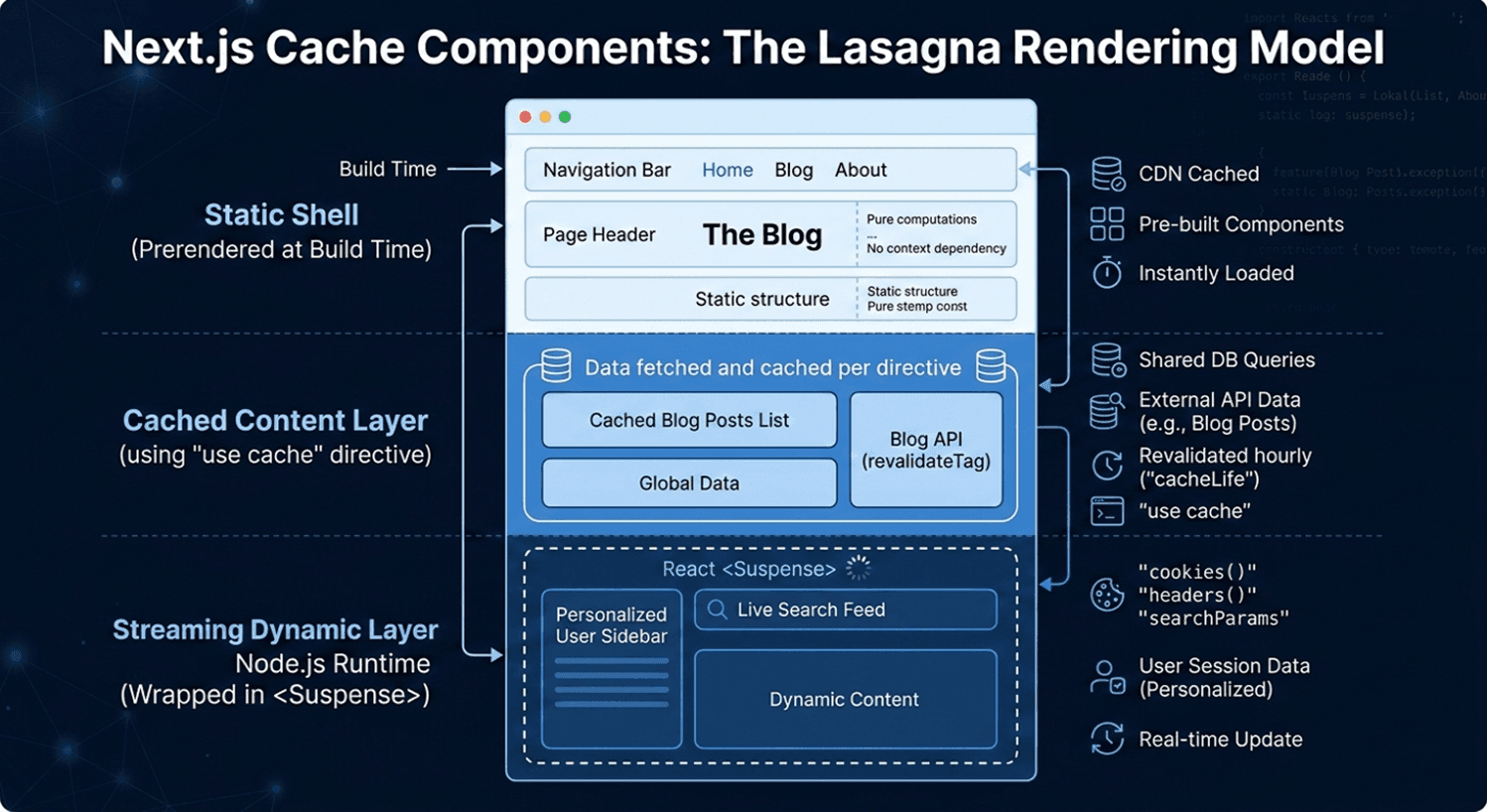
Here's what lives where:
Automatically in the static shell:
- Module imports
- Pure computations
- Synchronous file system reads
- Anything that doesn't touch the network or request context
Cached with use cache (included in static shell):
- External API data that doesn't change per-user
- Database queries for shared content (product catalogs, blog posts)
- Any async operation you explicitly mark as cacheable
Streamed at request time (wrapped in <Suspense>):
- cookies() and headers()
- searchParams, params
- Personalized user data
- Real-time feeds
The key insight is this: Next.js now requires you to make an explicit choice. If a component accesses runtime data and isn't wrapped in <Suspense> or marked with use cache, you'll get an error during development – not a silent performance regression. That's a huge improvement in developer ergonomics.
The use cache Directive - Your New Best Friend
The use cache directive is the heart of this model, and it replaces the old route-level export const revalidate = 3600 pattern. The key difference? Granularity. Instead of applying caching to a whole route, you apply it at the component or function level.
1 2 3 4 5 6 7 8 9 10 11 12 13 14 15 16 17 18// app/components/BlogPosts.tsx import { cacheLife } from 'next/cache'; async function BlogPosts() { 'use cache'; cacheLife('hours'); const res = await fetch('https://api.example.com/posts'); const posts = await res.json(); return ( <ul> {posts.map((post) => ( <li key={post.id}>{post.title}</li> ))} </ul> ); }
The arguments and props passed to a cached component automatically become part of the cache key. So if BlogPosts receives a category prop, different categories get different cache entries – no manual key construction needed.
cacheLife() - Controlling cache duration
Next.js ships with a set of semantic cache profiles out of the box:
| Profile | Stale | Revalidate | Expire | Best for |
|---|---|---|---|---|
| seconds | 0 | 1s | 1s | Real-time data |
| minutes | 5 min | 1 min | 1 hour | Frequently updating |
| hours | 5 min | 1 hour | 1 day | Daily updates |
| days | 5 min | 1 day | 1 week | Weekly updates |
| weeks | 5 min | 1 week | 30 days | Monthly updates |
| max | 5 min | 30 days | 1 year | Near-immutable content |
You can also define completely custom profiles in next.config.ts and reference them by name across your app:
1 2 3 4 5 6 7 8 9 10 11 12// next.config.ts const nextConfig = { cacheComponents: true, cacheLife: { biweekly: { stale: 60 * 60 * 24 * 14, // 14 days revalidate: 60 * 60 * 24, // 1 day expire: 60 * 60 * 24 * 14, // 14 days }, }, }
Then use it anywhere:
1 2 3 4 5 6 7 8'use cache'; import { cacheLife } from 'next/cache'; export default async function Page() { cacheLife('biweekly'); // ... }
One important nuance for nested components: if a parent has use cache without an explicit cacheLife, and a child component has cacheLife('hours'), the shorter duration wins for the parent. If the parent explicitly sets its own cacheLife, it keeps that – the child's shorter duration doesn't override it.
Handling runtime data without wrecking your static shell
Here's the pattern that solves the original runtime env variable problem cleanly. Runtime data like cookies() can't be cached – it's inherently per-request. But you can extract values from runtime APIs and pass them as props into a cached function:
1 2 3 4 5 6 7 8 9 10 11 12 13 14 15 16 17 18 19 20 21 22 23 24 25 26 27 28 29 30 31 32 33// app/profile/page.tsx import { cookies } from 'next/headers'; import { Suspense } from 'react'; export default function Page() { return ( <Suspense fallback={<div>Loading profile...</div>}> <ProfileContent /> </Suspense> ); } // Reads runtime data — not cached async function ProfileContent() { const sessionId = (await cookies()).get('session')?.value; return <CachedUserData sessionId={sessionId} />; } // Cached per session ID — sessionId becomes cache key async function CachedUserData({ sessionId, }: { sessionId: string; }) { 'use cache'; cacheLife('minutes'); const user = await db.getUserBySession(sessionId); return <div>Welcome, {user.name}</div>; }
The static shell ships instantly. The personalized data streams in. And the per-user DB query is even cached per session – so repeat visits are blazingly fast.
cacheTag and on-demand revalidation
Long cache durations only work if you can invalidate them when content changes. That's where cacheTag comes in. Tag your cached data, then call revalidateTag (for eventual consistency) or updateTag (for immediate refresh within the same request) from a Server Action:
1 2 3 4 5 6 7 8 9 10 11 12 13 14 15// Getting posts — tagged for invalidation async function getPosts() { 'use cache'; cacheTag('posts'); cacheLife('days'); return await db.query('SELECT * FROM posts'); } // Server action after creating a post async function createPost(formData: FormData) { 'use server'; await db.insert(formData); revalidateTag('posts'); // Next request gets fresh data }
This pattern is ideal for CMS-driven sites – long cache durations with surgical invalidation on publish. No more blanket revalidate = 60 hoping for the best.
What cache components replaces (migration cheat sheet)
If you're migrating an existing Next.js app, here's what to swap out:
| Old Pattern | New Pattern | Notes |
|---|---|---|
| export const dynamic = 'force-dynamic' | Remove it | All pages are dynamic-capable by default |
| export const revalidate = 3600 | 'use cache' + cacheLife('hours') | Now component-level, not route-level |
| export const fetchCache = 'force-cache' | Remove it | use cache handles this automatically |
| unstable_cache(fn, keys) | 'use cache' on the function | Cleaner, no manual key management |
| export const dynamic = 'force-static' | 'use cache' + cacheLife('max') | Add Suspense for runtime data |
| runtime = 'edge' | Not supported | Cache Components requires Node.js runtime |
A complete real-world example
Here's what a production-ready blog page looks like with Cache Components – static nav, cached posts, personalized sidebar all in one route:
1 2 3 4 5 6 7 8 9 10 11 12 13 14 15 16 17 18 19 20 21 22 23 24 25 26 27 28 29 30 31 32 33 34 35 36 37 38 39 40 41 42 43 44 45 46 47 48 49 50 51 52 53 54 55 56import { Suspense } from 'react'; import { cookies } from 'next/headers'; import { cacheLife, cacheTag } from 'next/cache'; import Link from 'next/link'; // Static shell — prerendered automatically export default function BlogPage() { return ( <> <header> <h1>The Blog</h1> <nav> <Link href="/">Home</Link> | <Link href="/about">About</Link> </nav> </header> {/* Cached — shared across all users, revalidated hourly */} <Suspense fallback={<p>Loading posts...</p>}> <BlogPosts /> </Suspense> {/* Dynamic — streams per user request, never cached */} <Suspense fallback={<p>Personalizing your feed...</p>}> <PersonalizedSidebar /> </Suspense> </> ); } async function BlogPosts() { 'use cache'; cacheLife('hours'); cacheTag('blog-posts'); const posts = await fetch('https://api.example.com/posts').then((r) => r.json() ); return ( <ul> {posts.map((p: { id: string; title: string }) => ( <li key={p.id}>{p.title}</li> ))} </ul> ); } // cookies() makes this dynamic per-request async function PersonalizedSidebar() { const theme = (await cookies()).get('theme')?.value ?? 'light'; // Optionally: validate the theme value to prevent injection const safeTheme = theme === 'dark' ? 'dark' : 'light'; return <aside data-theme={safeTheme}>Your personalized content here</aside>; }
The user gets the full page shell – header and blog posts – instantly from CDN. The sidebar streams in right after. No full-page server round-trip. No compromises.
One hard limit: no edge runtime
Before you go all-in – note that Cache Components requires the Node.js runtime. Edge Runtime is explicitly not supported and will throw errors. If your current architecture relies on Edge middleware for personalization, you'll need to evaluate whether migrating those concerns to Suspense boundaries (with Node runtime) makes sense for your app.
Final thought
The runtime environment variable problem was never about the variables themselves. It was about the rendering model lacking the precision to say "this tiny part is dynamic, everything else is static." Cache Components finally delivers that precision – and in doing so, turns PPR from an experimental opt-in into the obvious, sensible default.
If you're a CTO or tech lead evaluating Next.js for your next platform decision, this is the architecture story worth paying attention to. Static where possible. Dynamic where necessary. Cached where smart. All on one page.
Enable cacheComponents: true, migrate your revalidate exports to use cache + cacheLife, wrap your runtime data in <Suspense>, and you're in a fundamentally better place – for performance, for DX, and for the users who actually visit your site.
Marzena Polana
Frontend Developer
Share this post
Related posts










Want to light up your ideas with us?
Kickstart your new project with us in just 1 step!
Prefer to call or write a traditional e-mail?